1️⃣ 시스템 업데이트 (가장 먼저)
sudo apt update
sudo apt upgrade -y
sudo apt autoremove -y
재부팅:
sudo reboot
2️⃣ 기본 필수 패키지
sudo apt install -y \
  curl wget git vim nano htop tree unzip zip \
  net-tools software-properties-common ca-certificates \
  build-essential
3️⃣ 타임존 / 시간 설정 (KST)
timedatectl set-timezone Asia/Seoul
timedatectl
NTP 동기화 확인:
timedatectl set-ntp true
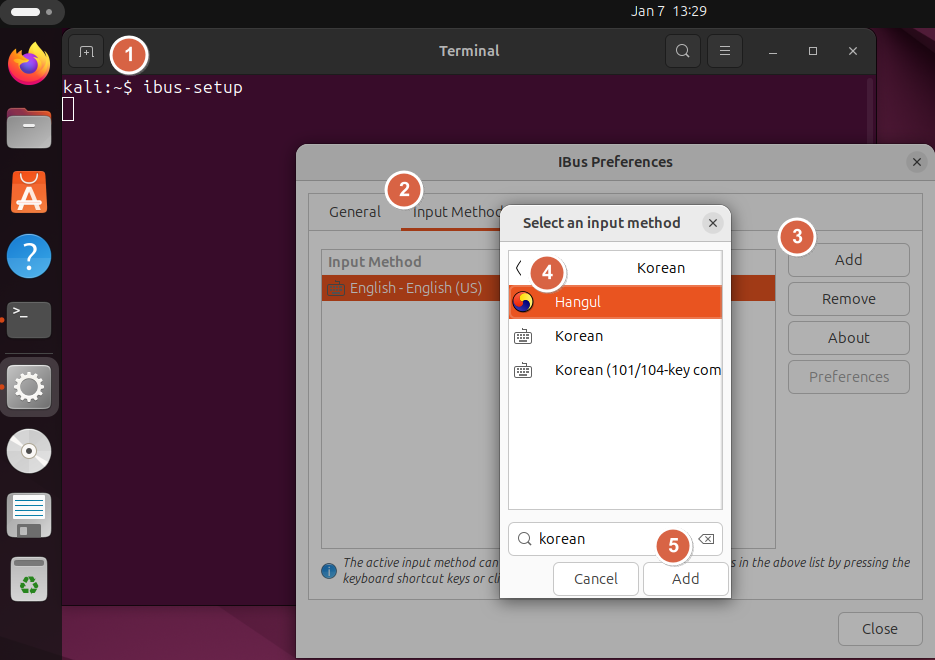
4️⃣ 한글 환경 (데스크톱)
sudo apt install -y \
  language-pack-ko \
  fonts-noto-cjk \
  ibus-hangul
적용: reboot
설정 → Region & Language → Input Sources → Korean (Hangul) 추가
5️⃣ SSH 서버 (원격 접속용)
sudo apt install -y openssh-server
sudo systemctl enable --now ssh
확인:
ss -ntlp | grep ssh
6️⃣ 방화벽 (UFW)
sudo ufw allow OpenSSH
sudo ufw enable
sudo ufw status
7️⃣ 스왑 확인 (RAM 적을 때 중요)
swapon --show
free -h
스왑 없으면 (예: 4GB):
sudo fallocate -l 4G /swapfile
sudo chmod 600 /swapfile
sudo mkswap /swapfile
sudo swapon /swapfile
echo '/swapfile none swap sw 0 0' | sudo tee -a /etc/fstab
8️⃣ 프롬프트 간소화 (Ubuntu 기본 너무 김)
nano ~/.bashrc
맨 아래 추가:
export PS1='\u:\W\$ '
적용:
source ~/.bashrc
결과:
user:work$
9️⃣ Git 기본 설정
git config --global user.name "Your Name"
git config --global user.email "you@example.com"
git config --global init.defaultBranch main
🔟 자동 업데이트 (보안만)
sudo apt install -y unattended-upgrades
sudo dpkg-reconfigure unattended-upgrades
1️⃣1️⃣ 성능 & 전원 (노트북)
sudo apt install -y tlp
sudo systemctl enable --now tlp
1️⃣2️⃣ 개발자 환경 (선택)
Python
sudo apt install -y python3 python3-pip python3-venv
Node.js (LTS)
curl -fsSL https://deb.nodesource.com/setup_lts.x | sudo -E bash -
sudo apt install -y nodejs
Docker
curl -fsSL https://get.docker.com | sudo sh
sudo usermod -aG docker $USER
newgrp docker
1️⃣3️⃣ GNOME 쓸모있는 설정
파일 관리자 숨김파일
Ctrl + H
최소 버튼
gsettings set org.gnome.desktop.wm.preferences button-layout 'appmenu:minimize,maximize,close'
1️⃣4️⃣ 로그 & 시스템 점검
journalctl -p 3 -xb
df -h
lsblk'공학속으로 > 운영체제' 카테고리의 다른 글
| [Linux] 우분투 방화벽(UFW) 설정 (0) | 2026.01.07 |
|---|---|
| [Linux] 우분투 전원 꺼짐 방지 (0) | 2026.01.07 |
| [Linux] 우분투에서 Notepad++ 설치하기 (0) | 2026.01.07 |
| 리눅스에서 dd 명령어로 디스크 이미지 뜨는 방법 (0) | 2025.09.19 |
| 리눅스에서 디바이스 마운트하기 (0) | 2025.09.19 |


댓글